

端到端语音语言大模型(Flex)
接口描述
百度端到端语音语言大模型(Flex)基于语音大模型技术,具备极速响应、自然语音交互能力,支持音色替换及Function Call,可结合业务场景灵活配置,满足智能硬件、AI助手及行业应用等场景的语音交互需求。(本接口处于公测阶段,如有意向请提交合作咨询详细沟通)
产品优势
超低时延: 基于语音大模型技术,支持实时语音交互,快速响应用户指令,提升语音交互流畅度。
任务执行: 支持Function Call连接外部工具及业务系统,实现语音理解、决策与任务执行的闭环。
音色定制: 支持音色替换,可根据业务场景配置个性化音色,打造差异化的品牌语音体验。
接口调用详情
交互流程
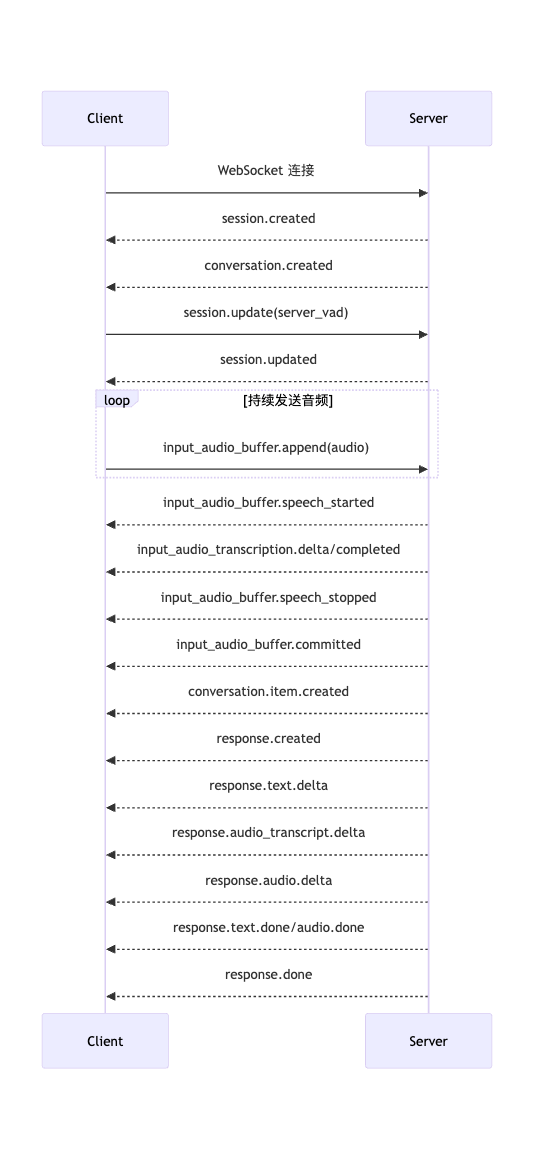
服务端 VAD 自动响应时序
一次典型的服务端 VAD 语音对话流程如下:
- 客户端建立 WebSocket 连接。
- 服务端发送
session.created和conversation.created。 - 客户端发送
session.update配置音色、指令、VAD 和工具等参数。 - 客户端持续发送
input_audio_buffer.append,音频内容使用 Base64 编码。 - 服务端检测到语音后发送
input_audio_buffer.speech_started;检测到停顿后发送input_audio_buffer.speech_stopped。 - 启用自动响应时,服务端提交音频、创建用户对话项并开始生成响应。
- 服务端通过
response.*.delta事件流式返回文本、音频转写、音频或函数参数。 - 服务端发送
response.done,表示本次响应完成、取消或失败。
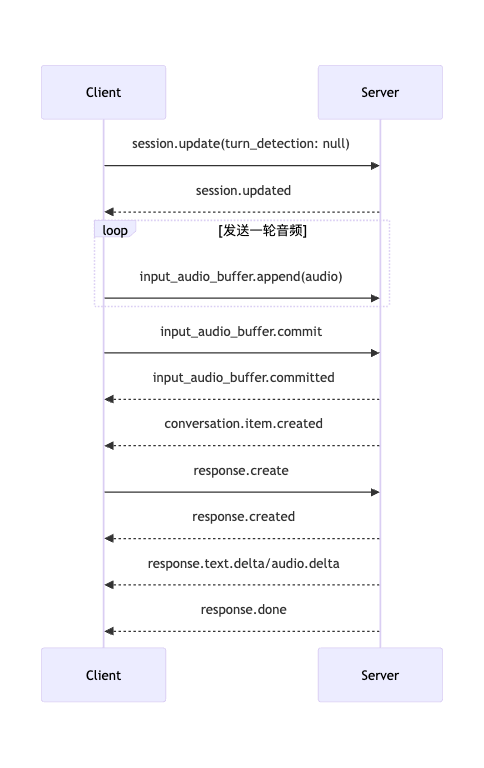
手动提交音频时序
关闭 VAD 时,客户端自行决定一轮输入何时结束,并显式创建响应。
接口说明
请求地址
1wss://aip.baidubce.com/ws/2.0/speech/v1/realtime?model={model}认证鉴权
支持 API Key 和 access_token 两种方式,具体请参考鉴权认证机制。
| 方式 | 位置 | 示例 |
|---|---|---|
| Access Token | URL 查询参数 | access_token=24.xxxxx |
| API Key | HTTP Header | Authorization: Bearer bce-v3/ALTAK-xxxxx |
请求参数
| 参数 | 类型 | 必填 | 说明 |
|---|---|---|---|
model |
string | 是 | 模型名称 |
示例:wss://aip.baidubce.com/ws/2.0/speech/v1/realtime?model=qianfan-realtime-flex-v1
模型列表
| 模型 | 模型名称 | 使用场景 |
|---|---|---|
| 端到端语音语言大模型(Flex) | qianfan-realtime-flex-v1 | 灵活性、任务型场景 |
客户端事件
session.update
事件描述
更新会话默认配置。省略的字段保持当前值不变。模型和音色在首个音频响应开始后不能修改
事件参数
| 参数 | 类型 | 必填 | 说明 |
|---|---|---|---|
type |
string | 是 | 固定为session.update |
event_id |
string | 否 | 客户端事件 ID |
session |
SessionParams | 是 | 需要更新的会话参数 |
示例
1{
2  "type": "session.update",
3  "event_id": "event_001",
4  "session": {
5    "modalities": ["text", "audio"],
6    "instructions": "请使用简洁、自然的中文回答。",
7    "voice": "default",
8    "input_audio_format": "pcm16",
9    "output_audio_format": "pcm16",
10    "input_audio_transcription": {
11      "model": "default",
12      "language": "zh"
13    },
14    "turn_detection": {
15      "type": "server_vad",
16      "threshold": 0.5,
17      "prefix_padding_ms": 300,
18      "silence_duration_ms": 200,
19      "create_response": true,
20      "interrupt_response": true
21    }
22  }
23}
conversation.item.create
事件描述
在默认对话中创建一条对话项。可提交用户文本、用户音频、助手消息或函数调用结果。previous_item_id 为空时追加到对话末尾
事件参数
| 参数 | 类型 | 必填 | 说明 |
|---|---|---|---|
type |
string | 是 | 固定为conversation.item.create |
event_id |
string | 否 | 客户端事件 ID |
previous_item_id |
string | 否 | 新项目的前一项目 ID |
item |
ConversationItem | 是 | 要创建的对话项 |
示例
1{
2  "type": "conversation.item.create",
3  "event_id": "event_002",
4  "item": {
5    "type": "message",
6    "role": "user",
7    "content": [
8      {
9        "type": "input_text",
10        "text": "请介绍一下杭州西湖。"
11      }
12    ]
13  }
14}
conversation.item.retrieve
事件描述
按 ID 获取默认对话中的单个项目
事件参数
| 参数 | 类型 | 必填 | 说明 |
|---|---|---|---|
type |
string | 是 | 固定为conversation.item.retrieve |
event_id |
string | 否 | 客户端事件 ID |
item_id |
string | 是 | 项目 ID |
示例
1{
2  "type": "conversation.item.retrieve",
3  "event_id": "event_003",
4  "item_id": "item_001"
5}
conversation.item.delete
事件描述
从默认对话中删除指定项目。删除后,该项目不再参与后续响应的上下文构建
事件参数
| 参数 | 类型 | 必填 | 说明 |
|---|---|---|---|
type |
string | 是 | 固定为conversation.item.delete |
event_id |
string | 否 | 客户端事件 ID |
item_id |
string | 是 | 项目 ID |
示例
1{
2  "type": "conversation.item.delete",
3  "event_id": "event_004",
4  "item_id": "item_001"
5}
input_audio_buffer.append
事件描述
向输入音频缓冲区追加一段音频。音频格式必须与会话的 input_audio_format 一致
事件参数
| 参数 | 类型 | 必填 | 说明 |
|---|---|---|---|
type |
string | 是 | 固定为input_audio_buffer.append |
event_id |
string | 否 | 客户端事件 ID |
audio |
string | 是 | Base64 编码的音频字节 |
示例
1{
2  "type": "input_audio_buffer.append",
3  "event_id": "event_005",
4  "audio": "AAABAAIA..."
5}
input_audio_buffer.commit
事件描述
提交当前输入音频缓冲区并创建用户音频对话项。该事件本身不会创建模型响应;关闭 VAD 时,提交后还需发送 response.create。缓冲区音频时长必须 ≥ 100ms才可提交
事件参数
| 参数 | 类型 | 必填 | 说明 |
|---|---|---|---|
type |
string | 是 | 固定为input_audio_buffer.commit |
event_id |
string | 否 | 客户端事件 ID |
示例
1{
2  "type": "input_audio_buffer.commit",
3  "event_id": "event_006"
4}
input_audio_buffer.clear
事件描述
清空尚未提交的输入音频缓冲区
事件参数
| 参数 | 类型 | 必填 | 说明 |
|---|---|---|---|
type |
string | 是 | 固定为input_audio_buffer.clear |
event_id |
string | 否 | 客户端事件 ID |
示例
1{
2  "type": "input_audio_buffer.clear",
3  "event_id": "event_007"
4}
response.create
事件描述
基于当前对话上下文创建模型响应。response 中的字段仅覆盖本次响应;未设置的字段继承会话配置
事件参数
| 参数 | 类型 | 必填 | 说明 |
|---|---|---|---|
type |
string | 是 | 固定为response.create |
event_id |
string | 否 | 客户端事件 ID |
response |
object | 否 | 本次响应参数;未设置的响应配置字段继承当前会话配置 |
response 字段
| 字段 | 类型 | 必填 | 取值或限制 | 说明 |
|---|---|---|---|---|
conversation |
string | 否 | auto |
是否将本次响应写入默认会话;默认auto。 |
input |
ConversationItem[] | 否 | 最多 100 项 | 为本次响应指定输入上下文;省略时使用默认对话,空数组表示不使用对话上下文;可使用item_reference 引用已有项目。input 数组中的 message 暂不支持 input_audio 类型的content part |
modalities |
string[] | 否 | ["text"] 或 ["text", "audio"] |
本次响应的输出模态 |
instructions |
string | 否 | 最多 8192 个字符 | 本次响应使用的指令;省略时继承会话指令 |
voice |
string | 否 | 当前会话音色 | 本次响应的输出音色;当前实现不允许通过响应事件切换会话音色 |
output_audio_format |
string | 否 | pcm16 |
本次响应的音频格式 |
tools |
Tool[] | 否 | 最多 20 个 | 本次响应可用的工具 |
tool_choice |
string | 否 | auto |
工具选择策略 |
temperature |
number | 否 | 0.6~1.2 | 本次响应的采样温度,默认继承会话配置 |
max_output_tokens |
integer/string | 否 | 1~4096 或inf |
本次响应最大输出 Token 数 |
metadata |
object | 否 | 最多 16 个键;键最长 64,值最长 512 个字符 | 附加到本次响应的元数据 |
示例
1{
2  "type": "response.create",
3  "event_id": "event_008",
4  "response": {
5    "modalities": ["text", "audio"],
6    "instructions": "请用一句话回答。",
7    "conversation": "auto",
8    "max_output_tokens": 256
9  }
10}
response.cancel
事件描述
取消正在生成的响应。省略 response_id 时取消当前活动响应
事件参数
| 参数 | 类型 | 必填 | 说明 |
|---|---|---|---|
type |
string | 是 | 固定为response.cancel |
event_id |
string | 否 | 客户端事件 ID |
response_id |
string | 否 | 要取消的响应 ID |
示例
1{
2  "type": "response.cancel",
3  "event_id": "event_009",
4  "response_id": "resp_001"
5}
服务端事件
session.created
事件描述
WebSocket 会话初始化完成后发送,包含当前完整会话配置
事件参数
| 参数 | 类型 | 说明 |
|---|---|---|
type |
string | 固定为session.created |
event_id |
string | 服务端事件 ID |
session |
Session | 完整会话对象 |
示例
1{
2  "type": "session.created",
3  "event_id": "event_server_002",
4  "session": {
5    "id": "sess_001",
6    "object": "realtime.session",
7    "model": "qwen3-omni-safe",
8    "modalities": ["text", "audio"],
9    "input_audio_format": "pcm16",
10    "output_audio_format": "pcm16",
11    "voice": "default"
12  }
13}
session.updated
事件描述
成功处理 session.update 后发送,返回更新后的完整会话配置
事件参数
| 参数 | 类型 | 说明 |
|---|---|---|
type |
string | 固定为session.updated |
event_id |
string | 服务端事件 ID |
session |
Session | 更新后的会话对象 |
示例
1{
2  "type": "session.updated",
3  "event_id": "event_server_003",
4  "session": {
5    "id": "sess_001",
6    "object": "realtime.session",
7    "model": "qwen3-omni-safe",
8    "instructions": "请使用简洁、自然的中文回答。"
9  }
10}
conversation.created
事件描述
默认对话创建完成后发送
事件参数
| 参数 | 类型 | 说明 |
|---|---|---|
type |
string | 固定为conversation.created |
event_id |
string | 服务端事件 ID |
conversation |
Conversation | 对话对象 |
示例
1{
2  "type": "conversation.created",
3  "event_id": "event_server_004",
4  "conversation": {
5    "id": "conv_001",
6    "object": "realtime.conversation"
7  }
8}
conversation.item.created
事件描述
对话项成功加入默认对话后发送。输入音频提交、客户端创建项目和模型输出均可能触发此事件
事件参数
| 参数 | 类型 | 说明 |
|---|---|---|
type |
string | 固定为conversation.item.created |
event_id |
string | 服务端事件 ID |
previous_item_id |
string/null | 前一项目 ID |
item |
ConversationItem | 已创建的项目 |
示例
1{
2  "type": "conversation.item.created",
3  "event_id": "event_server_005",
4  "previous_item_id": null,
5  "item": {
6    "id": "item_001",
7    "object": "realtime.item",
8    "type": "message",
9    "status": "completed",
10    "role": "user",
11    "content": [{"type": "input_text", "text": "你好"}]
12  }
13}
conversation.item.retrieved
事件描述
成功处理 conversation.item.retrieve 后发送
事件参数
| 参数 | 类型 | 说明 |
|---|---|---|
type |
string | 固定为conversation.item.retrieved |
event_id |
string | 服务端事件 ID |
item |
ConversationItem | 获取到的项目 |
示例
1{
2  "type": "conversation.item.retrieved",
3  "event_id": "event_server_006",
4  "item": {
5    "id": "item_001",
6    "object": "realtime.item",
7    "type": "message",
8    "role": "user",
9    "content": [{"type": "input_text", "text": "你好"}]
10  }
11}
conversation.item.deleted
事件描述
成功删除对话项后发送
事件参数
| 参数 | 类型 | 说明 |
|---|---|---|
type |
string | 固定为conversation.item.deleted |
event_id |
string | 服务端事件 ID |
item_id |
string | 已删除的项目 ID |
示例
1{
2  "type": "conversation.item.deleted",
3  "event_id": "event_server_007",
4  "item_id": "item_001"
5}
conversation.item.input_audio_transcription.delta
事件描述
流式返回用户输入音频的识别文本增量
事件参数
| 参数 | 类型 | 说明 |
|---|---|---|
type |
string | 固定为conversation.item.input_audio_transcription.delta |
event_id |
string | 服务端事件 ID |
item_id |
string | 用户音频项目 ID |
content_index |
integer | 内容在项目content 中的索引 |
delta |
string | 新增识别文本 |
示例
1{
2  "type": "conversation.item.input_audio_transcription.delta",
3  "event_id": "event_server_008",
4  "item_id": "item_audio_001",
5  "content_index": 0,
6  "delta": "你好"
7}
conversation.item.input_audio_transcription.completed
事件描述
输入音频识别完成后发送,包含完整识别文本
事件参数
| 参数 | 类型 | 说明 |
|---|---|---|
type |
string | 固定为conversation.item.input_audio_transcription.completed |
event_id |
string | 服务端事件 ID |
item_id |
string | 用户音频项目 ID |
content_index |
integer | 内容索引 |
transcript |
string | 完整识别文本 |
示例
1{
2  "type": "conversation.item.input_audio_transcription.completed",
3  "event_id": "event_server_009",
4  "item_id": "item_audio_001",
5  "content_index": 0,
6  "transcript": "你好,请介绍一下杭州西湖。"
7}
conversation.item.input_audio_transcription.failed
事件描述
输入音频识别失败后发送
事件参数
| 参数 | 类型 | 说明 |
|---|---|---|
type |
string | 固定为conversation.item.input_audio_transcription.failed |
event_id |
string | 服务端事件 ID |
item_id |
string | 用户音频项目 ID |
content_index |
integer | 内容索引 |
error |
Error | 识别错误详情 |
示例
1{
2  "type": "conversation.item.input_audio_transcription.failed",
3  "event_id": "event_server_010",
4  "item_id": "item_audio_001",
5  "content_index": 0,
6  "error": {
7    "type": "server_error",
8    "code": "internal_error",
9    "message": "Input audio transcription failed."
10  }
11}
input_audio_buffer.committed
事件描述
输入音频缓冲区提交成功后发送
事件参数
| 参数 | 类型 | 说明 |
|---|---|---|
type |
string | 固定为input_audio_buffer.committed |
event_id |
string | 服务端事件 ID |
previous_item_id |
string/null | 前一对话项 ID |
item_id |
string | 本次音频对应的用户项目 ID |
示例
1{
2  "type": "input_audio_buffer.committed",
3  "event_id": "event_server_011",
4  "previous_item_id": "item_001",
5  "item_id": "item_audio_001"
6}
input_audio_buffer.cleared
事件描述
输入音频缓冲区清空成功后发送
事件参数
| 参数 | 类型 | 说明 |
|---|---|---|
type |
string | 固定为input_audio_buffer.cleared |
event_id |
string | 服务端事件 ID |
示例
1{
2  "type": "input_audio_buffer.cleared",
3  "event_id": "event_server_012"
4}
input_audio_buffer.speech_started
事件描述
服务端 VAD 检测到用户开始说话后发送。如果启用了 interrupt_response,当前正在生成的响应将被打断
事件参数
| 参数 | 类型 | 说明 |
|---|---|---|
type |
string | 固定为input_audio_buffer.speech_started |
event_id |
string | 服务端事件 ID |
audio_start_ms |
integer | 当前缓冲区内语音开始位置,单位毫秒 |
item_id |
string | 本轮用户音频项目 ID |
示例
1{
2  "type": "input_audio_buffer.speech_started",
3  "event_id": "event_server_013",
4  "audio_start_ms": 120,
5  "item_id": "item_audio_002"
6}
input_audio_buffer.speech_stopped
事件描述
服务端 VAD 检测到用户停止说话后发送。启用 create_response 时,服务端随后自动提交音频并创建响应
事件参数
| 参数 | 类型 | 说明 |
|---|---|---|
type |
string | 固定为input_audio_buffer.speech_stopped |
event_id |
string | 服务端事件 ID |
audio_end_ms |
integer | 当前缓冲区内语音结束位置,单位毫秒 |
item_id |
string | 本轮用户音频项目 ID |
示例
1{
2  "type": "input_audio_buffer.speech_stopped",
3  "event_id": "event_server_014",
4  "audio_end_ms": 2380,
5  "item_id": "item_audio_002"
6}
response.created
事件描述
响应创建后发送
事件参数
| 参数 | 类型 | 说明 |
|---|---|---|
type |
string | 固定为response.created |
event_id |
string | 服务端事件 ID |
response |
Response | 响应对象 |
示例
1{
2  "type": "response.created",
3  "event_id": "event_server_015",
4  "response": {
5    "id": "resp_001",
6    "object": "realtime.response",
7    "status": "in_progress",
8    "output": []
9  }
10}
response.done
事件描述
响应结束后发送。status 可能为 completed、cancelled、failed 或 incomplete。该事件包含当前响应的最终输出和用量,不是整个会话的累计用量
事件参数
| 参数 | 类型 | 说明 |
|---|---|---|
type |
string | 固定为response.done |
event_id |
string | 服务端事件 ID |
response |
Response | 最终响应对象 |
示例
1{
2  "type": "response.done",
3  "event_id": "event_server_016",
4  "response": {
5    "id": "resp_001",
6    "object": "realtime.response",
7    "status": "completed",
8    "output": [],
9    "usage": {
10      "total_tokens": 43,
11      "input_tokens": 25,
12      "output_tokens": 18,
13      "input_token_details": {"text_tokens": 10, "audio_tokens": 15},
14      "output_token_details": {"text_tokens": 8, "audio_tokens": 10}
15    }
16  }
17}
response.output_item.added
事件描述
新的输出项目加入响应时发送
事件参数
| 参数 | 类型 | 说明 |
|---|---|---|
type |
string | 固定为response.output_item.added |
event_id |
string | 服务端事件 ID |
response_id |
string | 响应 ID |
output_index |
integer | 项目在响应输出数组中的索引 |
item |
ConversationItem | 输出项目 |
示例
1{
2  "type": "response.output_item.added",
3  "event_id": "event_server_017",
4  "response_id": "resp_001",
5  "output_index": 0,
6  "item": {
7    "id": "item_assistant_001",
8    "object": "realtime.item",
9    "type": "message",
10    "status": "in_progress",
11    "role": "assistant",
12    "content": []
13  }
14}
response.output_item.done
事件描述
单个输出项目生成结束后发送
事件参数
参数与 response.output_item.added 相同,item 为最终状态。
示例
1{
2  "type": "response.output_item.done",
3  "event_id": "event_server_018",
4  "response_id": "resp_001",
5  "output_index": 0,
6  "item": {
7    "id": "item_assistant_001",
8    "object": "realtime.item",
9    "type": "message",
10    "status": "completed",
11    "role": "assistant",
12    "content": [{"type": "text", "text": "你好,很高兴见到你。"}]
13  }
14}
response.content_part.added
事件描述
新的内容部分加入输出项目时发送
事件参数
| 参数 | 类型 | 说明 |
|---|---|---|
type |
string | 固定为response.content_part.added |
event_id |
string | 服务端事件 ID |
response_id |
string | 响应 ID |
item_id |
string | 输出项目 ID |
output_index |
integer | 输出项目索引 |
content_index |
integer | 内容部分索引 |
part |
ConversationItemContentPart | 内容部分 |
示例
1{
2  "type": "response.content_part.added",
3  "event_id": "event_server_019",
4  "response_id": "resp_001",
5  "item_id": "item_assistant_001",
6  "output_index": 0,
7  "content_index": 0,
8  "part": {"type": "audio", "transcript": ""}
9}
response.content_part.done
事件描述
单个内容部分生成结束后发送
事件参数
参数与 response.content_part.added 相同,part 为最终状态。
示例
1{
2  "type": "response.content_part.done",
3  "event_id": "event_server_020",
4  "response_id": "resp_001",
5  "item_id": "item_assistant_001",
6  "output_index": 0,
7  "content_index": 0,
8  "part": {"type": "audio", "transcript": "你好,很高兴见到你。"}
9}
response.text.delta
事件描述
流式返回纯文本内容增量
事件参数
| 参数 | 类型 | 说明 |
|---|---|---|
type |
string | 固定为response.text.delta |
event_id |
string | 服务端事件 ID |
response_id |
string | 响应 ID |
item_id |
string | 输出项目 ID |
output_index |
integer | 输出项目索引 |
content_index |
integer | 内容部分索引 |
delta |
string | 新增文本 |
示例
1{
2  "type": "response.text.delta",
3  "event_id": "event_server_021",
4  "response_id": "resp_001",
5  "item_id": "item_assistant_001",
6  "output_index": 0,
7  "content_index": 0,
8  "delta": "你好"
9}
response.text.done
事件描述
纯文本内容生成完成后发送
事件参数
字段与 response.text.delta 相同,但使用 text 返回完整文本,不包含 delta。
示例
1{
2  "type": "response.text.done",
3  "event_id": "event_server_022",
4  "response_id": "resp_001",
5  "item_id": "item_assistant_001",
6  "output_index": 0,
7  "content_index": 0,
8  "text": "你好,很高兴见到你。"
9}
response.audio.delta
事件描述
流式返回合成音频增量。客户端应按事件顺序解码并播放
事件参数
| 参数 | 类型 | 说明 |
|---|---|---|
type |
string | 固定为response.audio.delta |
event_id |
string | 服务端事件 ID |
response_id |
string | 响应 ID |
item_id |
string | 输出项目 ID |
output_index |
integer | 输出项目索引 |
content_index |
integer | 内容部分索引 |
delta |
string | Base64 编码的音频字节 |
示例
1{
2  "type": "response.audio.delta",
3  "event_id": "event_server_023",
4  "response_id": "resp_001",
5  "item_id": "item_assistant_001",
6  "output_index": 0,
7  "content_index": 0,
8  "delta": "AAABAAIA..."
9}
response.audio.done
事件描述
当前响应的音频内容发送完毕后发送。本事件不携带完整音频,客户端需自行拼接此前的音频增量
事件参数
| 参数 | 类型 | 说明 |
|---|---|---|
| type | string | 事件类型,必须是response.audio.done |
| event_id | string | 事件唯一标识 |
| response_id | string | 响应的 ID |
| item_id | string | 添加了内容部分的消息项目的 ID |
| output_index | integer | 响应中输出项的索引 |
| content_index | integer | 项目内容数组中内容部分的索引 |
示例
1{
2  "type": "response.audio.done",
3  "event_id": "event_server_024",
4  "response_id": "resp_001",
5  "item_id": "item_assistant_001",
6  "output_index": 0,
7  "content_index": 0
8}
response.audio_transcript.delta
事件描述
流式返回响应音频对应的文本增量
事件参数
| 参数 | 类型 | 说明 |
|---|---|---|
| type | string | 事件类型,必须是response.audio_transcript.delta |
| event_id | string | 事件唯一标识 |
| response_id | string | 响应的 ID |
| item_id | string | 添加了内容部分的消息项目的 ID |
| output_index | integer | 响应中输出项的索引 |
| content_index | integer | 项目内容数组中内容部分的索引 |
| delta | string | 新增音频转写文本 |
示例
1{
2  "type": "response.audio_transcript.delta",
3  "event_id": "event_server_025",
4  "response_id": "resp_001",
5  "item_id": "item_assistant_001",
6  "output_index": 0,
7  "content_index": 0,
8  "delta": "你好"
9}
response.audio_transcript.done
事件描述
响应音频的文本生成完成后发送
事件参数
| 参数 | 类型 | 说明 |
|---|---|---|
| type | string | 事件类型,必须是response.audio_transcript.done |
| event_id | string | 事件唯一标识 |
| response_id | string | 响应的 ID |
| item_id | string | 添加了内容部分的消息项目的 ID |
| output_index | integer | 响应中输出项的索引 |
| content_index | integer | 项目内容数组中内容部分的索引 |
| transcript | string | 返回完整文本 |
示例
1{
2  "type": "response.audio_transcript.done",
3  "event_id": "event_server_026",
4  "response_id": "resp_001",
5  "item_id": "item_assistant_001",
6  "output_index": 0,
7  "content_index": 0,
8  "transcript": "你好,很高兴见到你。"
9}
response.function_call_arguments.delta
事件描述
流式返回函数调用参数的 JSON 字符串增量
事件参数
| 参数 | 类型 | 说明 |
|---|---|---|
type |
string | 固定为response.function_call_arguments.delta |
event_id |
string | 服务端事件 ID |
response_id |
string | 响应 ID |
item_id |
string | 函数调用项目 ID |
output_index |
integer | 输出项目索引 |
call_id |
string | 函数调用 ID |
delta |
string | 参数 JSON 字符串增量 |
示例
1{
2  "type": "response.function_call_arguments.delta",
3  "event_id": "event_server_027",
4  "response_id": "resp_002",
5  "item_id": "item_call_001",
6  "output_index": 0,
7  "call_id": "call_001",
8  "delta": "{\"city\":\"杭州"
9}
response.function_call_arguments.done
事件描述
函数调用参数生成完成后发送。客户端执行函数后,可通过 conversation.item.create 提交 function_call_output,再创建下一次响应
事件参数
| 参数 | 类型 | 说明 |
|---|---|---|
type |
string | 固定为response.function_call_arguments.done |
event_id |
string | 服务端事件 ID |
response_id |
string | 响应 ID |
item_id |
string | 函数调用项目 ID |
output_index |
integer | 输出项目索引 |
call_id |
string | 函数调用 ID |
arguments |
string | 完整参数 JSON 字符串 |
示例
1{
2  "type": "response.function_call_arguments.done",
3  "event_id": "event_server_028",
4  "response_id": "resp_002",
5  "item_id": "item_call_001",
6  "output_index": 0,
7  "call_id": "call_001",
8  "arguments": "{\"city\":\"杭州\"}"
9}
error
事件描述
表示客户端事件无效或服务端处理失败。收到 error 不一定意味着 WebSocket 连接已关闭,客户端应根据错误类型决定是否修正请求或重新连接
事件参数
| 参数 | 类型 | 说明 |
|---|---|---|
type |
string | 固定为error |
event_id |
string | 服务端事件 ID |
error |
Error | 错误详情 |
示例
1{
2  "type": "error",
3  "event_id": "event_server_001",
4  "error": {
5    "type": "invalid_request_error",
6    "code": "invalid_value",
7    "message": "Invalid value for session.input_audio_format.",
8    "param": "session.input_audio_format",
9    "event_id": "event_001"
10  }
11}
数据类型
Session
类型描述
服务端返回的完整实时会话对象,包含会话标识、当前配置和有效期
类型参数
| 参数 | 类型 | 说明 |
|---|---|---|
id |
string | 会话 ID |
object |
string | 固定为realtime.session |
model |
string | 当前模型 |
modalities |
string[] | 输出模态 |
instructions |
string | 系统指令 |
voice |
string | 输出音色 |
input_audio_format |
string | 输入音频格式 |
output_audio_format |
string | 输出音频格式 |
input_audio_transcription |
InputAudioTranscription/null | 输入音频转录配置;null 表示关闭 |
turn_detection |
TurnDetection/null | VAD 配置;null 表示关闭 |
tools |
Tool[] | 工具列表 |
tool_choice |
string/object | 工具选择策略 |
temperature |
number | 采样温度 |
max_output_tokens |
integer/string | 最大输出 Token 数 |
speed |
number | 输出语速 |
expires_at |
integer | 会话过期时间,Unix 秒时间戳 |
示例
1{
2  "id": "sess_001",
3  "object": "realtime.session",
4  "model": "qwen3-omni-safe",
5  "modalities": ["text", "audio"],
6  "voice": "default",
7  "input_audio_format": "pcm16",
8  "output_audio_format": "pcm16",
9  "temperature": 0.8,
10  "max_output_tokens": "inf",
11  "speed": 1.0
12}
SessionParams
类型描述
客户端可在 session.update 中设置的会话参数
类型参数
| 参数 | 类型 | 取值或限制 | 说明 |
|---|---|---|---|
model |
string | 连接时指定的模型 | 可传入相同值,不能切换模型 |
modalities |
string[] | ["text"]、["text","audio"] |
响应输出模态 |
instructions |
string | 最多 8192 个字符 | 系统指令 |
voice |
string | 可用音色名称 | 输出音色,音频输出开始后不可修改;默认为"default",查看更多支持音色 |
input_audio_format |
string | pcm16 |
输入音频格式 |
output_audio_format |
string | pcm16 |
输出音频格式 |
input_audio_transcription |
InputAudioTranscription/null | 见对应类型 | 输入音频转录;null 表示关闭 |
turn_detection |
TurnDetection/null | server_vad 或 null |
轮次检测配置 |
tools |
Tool[] | 最多 20 个 | 可供模型调用的工具 |
tool_choice |
string | auto |
工具选择策略 |
temperature |
number | 0.6~1.2 | 采样温度 |
max_output_tokens |
integer/string | 1~4096 或inf |
最大输出 Token 数 |
speed |
number | 0.5~1.5 | 输出语速 |
示例
1{
2  "modalities": ["text", "audio"],
3  "instructions": "请使用中文回答。",
4  "voice": "default",
5  "input_audio_format": "pcm16",
6  "output_audio_format": "pcm16",
7  "temperature": 0.8,
8  "max_output_tokens": 1024,
9  "speed": 1.0
10}
InputAudioTranscription
类型描述
输入音频识别配置。该配置控制转录事件,不改变模型接收到的音频内容。
类型参数
| 参数 | 类型 | 必填 | 取值 | 说明 |
|---|---|---|---|---|
model |
string | 是 | default |
当前支持的转录模型 |
language |
string/null | 否 | zh 或 null |
转录语言;省略或设为null 时使用默认行为 |
prompt |
string/null | 否 | 只能为null 或空字符串 |
当前实现暂不支持非空转录提示 |
示例
1{
2  "model": "default",
3  "language": "zh",
4  "prompt": ""
5}
TurnDetection
类型描述
服务端语音活动检测配置。将 turn_detection 设为 null 可关闭 VAD。
类型参数
| 参数 | 类型 | 取值或限制 | 说明 |
|---|---|---|---|
type |
string | server_vad |
检测类型 |
threshold |
number | 0~1 | VAD 激活阈值 |
prefix_padding_ms |
integer | 非负整数 | 语音开始前保留的音频长度;当前实现不设上限校验 |
silence_duration_ms |
integer | 非负整数 | 判定停止说话所需的静音时长;当前实现不设上限校验 |
create_response |
boolean | true/false |
停止说话后是否自动创建响应 |
interrupt_response |
boolean | true/false |
开始说话后是否打断当前响应 |
示例
1{
2  "type": "server_vad",
3  "threshold": 0.5,
4  "prefix_padding_ms": 300,
5  "silence_duration_ms": 200,
6  "create_response": true,
7  "interrupt_response": true
8}
Conversation
类型描述
会话的默认对话容器。
类型参数
| 参数 | 类型 | 说明 |
|---|---|---|
id |
string | 对话 ID |
object |
string | 固定为realtime.conversation |
示例
1{
2  "id": "conv_001",
3  "object": "realtime.conversation"
4}
ConversationItem
类型描述
对话中的消息或工具调用项目。
类型参数
| 参数 | 类型 | 说明 |
|---|---|---|
id |
string | 项目 ID;客户端创建时可省略 |
object |
string | 服务端返回时为realtime.item |
type |
string | message、function_call、function_call_output 或 item_reference |
status |
string | completed、in_progress 或 incomplete |
role |
string | 消息角色:user、assistant 或 system |
content |
ConversationItemContentPart[] | 消息内容数组,对conversation.item.create事件来说,当前一条 user message 最多只能有 1 个 input_audio content part。 |
call_id |
string | 函数调用及函数结果的关联 ID |
name |
string | 函数名称 |
arguments |
string | 函数参数 JSON 字符串 |
output |
string | 函数执行结果 |
示例
1{
2  "id": "item_001",
3  "object": "realtime.item",
4  "type": "message",
5  "status": "completed",
6  "role": "user",
7  "content": [
8    {"type": "input_text", "text": "杭州今天天气怎么样?"}
9  ]
10}
ConversationItemContentPart
类型描述
消息的单个内容部分。
类型参数
| 参数 | 类型 | 说明 |
|---|---|---|
type |
string | input_text、input_audio、text 或 audio |
text |
string | input_text 或 text 内容 |
audio |
string | Base64 编码的输入音频 |
transcript |
string | 输入或输出音频的转写文本 |
示例
1{
2  "type": "input_audio",
3  "audio": "AAABAAIA...",
4  "transcript": "杭州今天天气怎么样?"
5}
Response
类型描述
模型一次响应的状态、输出、配置和用量。
类型参数
| 参数 | 类型 | 说明 |
|---|---|---|
id |
string | 响应 ID |
object |
string | 固定为realtime.response |
status |
string | in_progress、completed、cancelled、failed 或 incomplete |
status_details |
ResponseStatusDetails/null | 响应状态 |
output |
ConversationItem[] | 输出项目 |
conversation_id |
string | 默认对话 ID;不写入对话时可为空 |
modalities |
string[] | 输出模态 |
voice |
string | 输出音色 |
output_audio_format |
string | 输出音频格式 |
temperature |
number | 采样温度 |
max_output_tokens |
integer/string | 最大输出 Token 数 |
usage |
ResponseUsage/null | 当前响应用量 |
metadata |
object | 客户端元数据 |
示例
1{
2  "id": "resp_001",
3  "object": "realtime.response",
4  "status": "completed",
5  "output": [],
6  "modalities": ["text", "audio"],
7  "voice": "default",
8  "output_audio_format": "pcm16",
9  "temperature": 0.8,
10  "max_output_tokens": 1024
11}
ResponseStatusDetails
类型描述
说明响应取消、失败或未完整生成的原因。
类型参数
| 参数 | 类型 | 说明 |
|---|---|---|
type |
string | 状态详情类型 |
reason |
string | 取消或未完成原因 |
error |
Error | 失败错误详情 |
常见 reason 包括客户端取消、用户开始说话打断、达到最大输出 Token 数和内容安全限制。客户端应以实际返回值为准。
示例
1{
2  "type": "incomplete",
3  "reason": "max_output_tokens"
4}
ResponseUsage
类型描述
当前响应的输入和输出 Token 用量。
类型参数
| 参数 | 类型 | 说明 |
|---|---|---|
total_tokens |
integer | 输入与输出 Token 总数 |
input_tokens |
integer | 输入 Token 数 |
output_tokens |
integer | 输出 Token 数 |
input_token_details |
object | 输入文本、音频及缓存 Token 明细 |
output_token_details |
object | 输出文本和音频 Token 明细 |
明细对象可包含 text_tokens、audio_tokens 和 cached_tokens。
示例
1{
2  "total_tokens": 43,
3  "input_tokens": 25,
4  "output_tokens": 18,
5  "input_token_details": {
6    "text_tokens": 10,
7    "audio_tokens": 15,
8    "cached_tokens": 0
9  },
10  "output_token_details": {
11    "text_tokens": 8,
12    "audio_tokens": 10
13  }
14}
Tool
类型描述
声明可供模型使用的函数或联网搜索工具。
类型参数
函数工具:
| 参数 | 类型 | 必填 | 说明 |
|---|---|---|---|
type |
string | 是 | 固定为function |
name |
string | 是 | 函数名称 |
description |
string | 否 | 函数用途说明 |
parameters |
object | 否 | JSON Schema 格式的参数定义 |
联网搜索工具:
| 参数 | 类型 | 必填 | 说明 |
|---|---|---|---|
type |
string | 是 | 固定为web_search |
示例
1{
2  "type": "function",
3  "name": "get_weather",
4  "description": "查询指定城市的天气",
5  "parameters": {
6    "type": "object",
7    "properties": {
8      "city": {"type": "string", "description": "城市名称"}
9    },
10    "required": ["city"]
11  }
12}
Error
类型描述
服务端错误详情。
类型参数
| 参数 | 类型 | 说明 |
|---|---|---|
type |
string | 错误类型,例如invalid_request_error 或 server_error |
code |
string | 错误码 |
message |
string | 可读错误信息 |
param |
string | 引发错误的参数路径 |
event_id |
string | 对应的客户端事件 ID |
示例
1{
2  "type": "invalid_request_error",
3  "code": "invalid_value",
4  "message": "Invalid value for session.input_audio_format.",
5  "param": "session.input_audio_format",
6  "event_id": "event_001"
7}
错误码汇总
接口通过 error 事件返回错误。常见错误类别如下:
| 错误类别或错误码 | 说明 | 建议处理方式 |
|---|---|---|
missing_model |
连接未提供模型参数 | 在 URL 中添加有效的model |
model_not_found |
模型不存在或当前接口不支持 | 检查模型名称 |
invalid_request_error |
事件结构或参数无效 | 根据param 和 message 修正请求 |
invalid_value |
参数值不在支持范围 | 使用文档列出的枚举或范围 |
missing_required_parameter |
缺少必填参数 | 补充错误信息指出的参数 |
unsupported_event |
当前实现不支持该客户端事件 | 改用本文档列出的客户端事件 |
server_error / internal_error |
服务端或下游处理异常 | 保留event_id,按业务策略重试或重新连接 |
鉴权阶段还可能通过 WebSocket 关闭码结束连接:
| 错误码 | 描述 |
|---|---|
| 3000 | 未授权 |
| 3003 | 禁止访问 |
| 3008 | 连接超时 |
| 4000 | 无效请求 |
| 1013 | 配额超限 |
附录:
DEMO
python
通过iam API_KEY调用时需要删除代码中的"&access_token={TOKEN}"。
评价此篇文章